Academics Notices
Dear Students(E4-EEE),

The *CGPA eligibility criterion for the Transcon Industries Recruitment Drive* has been revised from *8.0 CGPA to 7 CGPA*.

Students who meet the revised eligibility criteria and are interested in participating in the recruitment process are advised to complete their registration through the link below:

*Registration Link:* https://forms.gle/MNmXfKE8weZFTkHs5

*Registration Closes:* *Today, 4:00 PM*

All eligible and interested students are advised to complete the registration within the stipulated deadline.

*Training & Placement Office*
*RGUKT–Basar*
It is informed to all the students of EEE Dept. ( AB II -113, 202, 112, 201, 103 classes only) that they can collect their mobile phones from Student Welfare Office today ( 02-03-2020) 5 PM to 6 PM.
Dear student,

                               SCHEDULE OF ADP CAMPUS RECRUITMENT DRIVE

 It is hereby informed to all registered students of ADP that ADP recruitment drive is scheduled on 15th Dec 2017(i.e. Friday). All registered students are informed to report at AB-II for Written test to their allotted classes.

Note: It’s been observed that many of the students are not coming formally with clean shave and proper shoes with socks. Its hereby cautioned that if such things are observed the concerned student would be debarred from further placement activities.
The students are advised to be on time as mentioned in the notice’s given by placement cell, late reporting will not be entertained.

sd/-
Placement cell
Download: Notice Attachment
Dear student,


Toshiba Recruiting ME E4 students .Interested students need to register at placement cell omega-5.

Last date for registration: 19th April 2017, 4:00PM

sd/-
Placement cell
Download: Notice Attachment
NSS Cell of RGUKT-Basar as part of our commitment to environmental sustainability and raising awareness about climate change, we are thrilled to announce our participation in Earth Hour 2024 with the theme “Uniting for Our One Shared Home”
Earth Hour is a global movement initiated by the World Wide Fund for Nature (WWF) that encourages individuals, communities, and businesses to switch off non-essential lights for one hour. This symbolic gesture signifies our collective dedication to protecting our planet and preserving its resources for future generations.
This year, Earth Hour will take place on 23rd March 2024 from 8:30 to 9:30 p.m. local time. We invite all members of our University community to join us in this global initiative by turning off unnecessary lights and electrical appliances during this hour. Let's come together to demonstrate our commitment to sustainability and inspire others to take action.
Thank you for your support and participation in Earth Hour 2024. Let's unite for the planet!

Programme Schedule
1.	A walkathon with placards from AB-1 to faculty quarters  from 5:30Pm
2.	Lighting of Diya at AB-1by NSS volunteers during the Earth Hour ( 8:30 Pm to 9:30 Pm) to create awareness in students
3.	Switching of lights and other energy consuming systems exempting emergency services from 8:30 Pm to 9:30 Pm.
4.	Competitions on the observation of Earth Hour with the theme “Uniting for Our One Shared Home”.
5.	Encouragement for the competition

Sd/
NSS Programme Coordinator
Download: Notice Attachment
Dear Students,

   During the Bathukamma celebrations this evening:

- Please follow the instructions given by the security personnel on duty during the course of the event.

- Refrain from any activities that could cause discomfort to your fellow students.

 Let's all contribute to a harmonious and enjoyable event.


                        Sd/-
Associate Dean - Student Welfare
Download: Notice Attachment
Dear Students,

The students desirous for seeking reverification for AY_22-23_E4S1&S2_Remedial_Aug-23 Reverification Registration can pay the fee and submit their online applications available in https://hub.rgukt.ac.in/hub/revaluation on or before 5th September-23. Only online registrations will be accepted through the hub.


Fee Details: Re-verification Fee: Rs.200/- per subject.
Important Dates: Starting date of Registration: 02-09-23.
Last date for registration: 05-09-23.
Download: Notice Attachment
Dear Students,

Please find the attached file below.
Download: Notice Attachment
Dear Students,

Please find Below Attachment.
Download: Notice Attachment
The following student has selected for the recruitment drive of BACKFLIPT SOFTWARE SERVICES Pvt. Ltd.

S. No.	ID No.	Name of the Student
1      	B161721	VANAMAMALAI VIVEK VARDHAN


“HEARTY CONGRATULATIONS”

Sd/-
T & P Office
Download: Notice Attachment
Download: Notice Attachment
Dear Students,

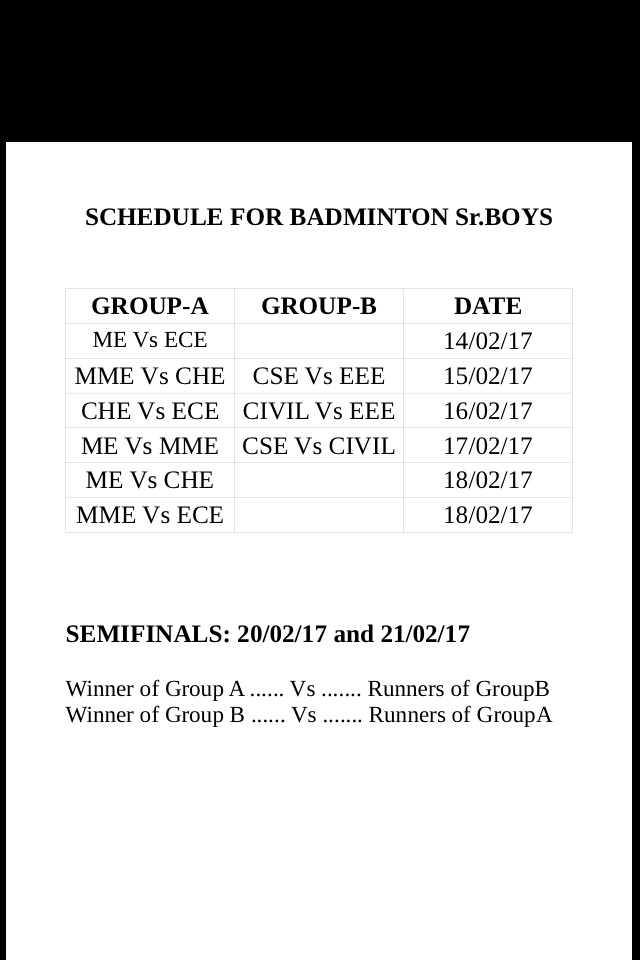
Please find the attachment for Sr. Boys Badminton Schedule

Sd/-

N. Rakesh
Convener, Sports & Games
Download: Notice Attachment
Dear students,

                            SELECTS OF THOUGHTWORKS

S.NO	ID NO	NAME OF THE STUDENT	BRANCH
1	     B141955	NAVEEN GENUPURI	          CSE
2	     B141070	SHAIK YOUSUF BABA	          CSE
3	     B141005	PANUGANTI MANIKANTA	  CSE
4	     B141064	BATHULA PRAVEEN	          ECE


***Hearty Congratulations to all***

sd/-
Placement OfficeCongratulations all!
Selected members list is attached below.Download: Notice Attachment
Dear Students,

The National Science Day celebrations will be held at ARCI on 28th Feb, 2017. The interested students can fill registration form and send their details before afternoon of today i.e.17.02.2017.

Note: For complete details you can go through the attachment.
Download: Notice Attachment