Academics Notices
It is to inform all the E4 students (except Chemical Engineering Students) who opted for CH4504 – Computational Fluid Dynamics (CFD) as Free Elective are here by informed that the class room allocation for CFD which was given in the earlier notice may be read as ABII – 014 instead of ABI – 014. However, there is no change in the timetable and faculty allocation.Download: Notice Attachment
Please find the attachment.Download: Notice Attachment
Dear Students,

                         SCHEDULE OF GGK TECHNOLOGIES RECRUITMENT DRIVE

It is hereby informed to all registered students of GGK TECHNOLOGIES that the recruitment is scheduled on 08.10.2018. All registered students need to report AB-I Auditorium at 8:45 AM sharp followed by Online test at AB-II.

     Venue: AB-I Auditorium
     Date & time: 08.10.2018, 8:45 AM.

Note: Go through attached notice for Class allotment

sd/-
Placement Office
Download: Notice Attachment
Dear Students,
find the attachment.


           Sd/-
Academic Section
Download: Notice Attachment
Hola guys...

Cultural Club of RGUKT is planning some dance performances on 5th August to end the Orientation Program with a high note. So, interested students should get ready with their performances. There will be a small audition in Dance Club on 28/07/2023 [i.e., Friday]. Shortlisted students from the auditions can get a chance to perform on the stage.

Venue: Dance Club
Date: 28/05/2023
Time: 5:00 pm
Note: You have to bring your own songs for auditions.

Cultural Convenor:
Dr.Vijay Kumar
9985717978

Student co-orinater:
P.Ashrith
8464844550
This is to inform all the E4 students, those who want to update their e-profile details or profile pictures are instructed to correct their details on or before 5:00 PM tomorrow i.e 19/04/2017.The students who wish to modify e-profile after specified time can submit a request letter to the Examination Section mentioning their necessary fields to be updated  by paying a fee of Rs. 500/-.

Note: students can login to HUB by giving their username, password and do the modifications by themselves.Download: Notice Attachment
Mela of events is about to hit the RGUKT.
Here is the tentative schedule of the events that may happen..
Please find the attachment.
Download: Notice Attachment
Download: Notice Attachment
Dear Students,

It is hereby informed to all registered students of Saksham that the drive is Scheduled on 11th April 2018 at AB-I auditorium at 1:00PM sharp followed by written test at AB-II.


sd/-
Placement Office.Dear all,
Please find the attachment of the subject cited above.
Sd/-
ME Dept.
Academic SectionDownload: Notice Attachment
Dear Students,

Go through the attached notice of Webinar by Teach For India.

Sd/-
Placement Office.
Download: Notice Attachment
Dear students,

The following is the shcedule for the team registration with the Sports Department.
1.  All thePUC( I & II)girls  are instructed to gather at Shathavahana Grounds on 10/02/2025 from 6 am onwards.
2.  All thePUC( I & II) boys   are instructed to gather at Shathavahana Grounds on 11/02/2025 from 6 am onwards.

All the PETs and PDs will be available for the team registrations.

List of games and sports is attached for your convenience.
Download: Notice Attachment
Dear Students,

Polmon conducting recruitment drive for 2021 passing out students. Interested & eligible students need to register by 3.03.2021, 2:00PM.

Eligibility Criteria:

Branches: ECE & Mech
CTC: Mech(2 to 2.4 LPA), ECE( 2 to 3 LPA)
Internship: 6 months with 12000 Stipend
Bond: 3 yrs agreement required and certificates to be submitted

Registration Link: https://forms.gle/9cVrvenCKKvXoFBg7

Last Date for Registration: 03.03.2021,2:00PM.

sd/-
Placement Office.Greetings from NSS RGUKT B,
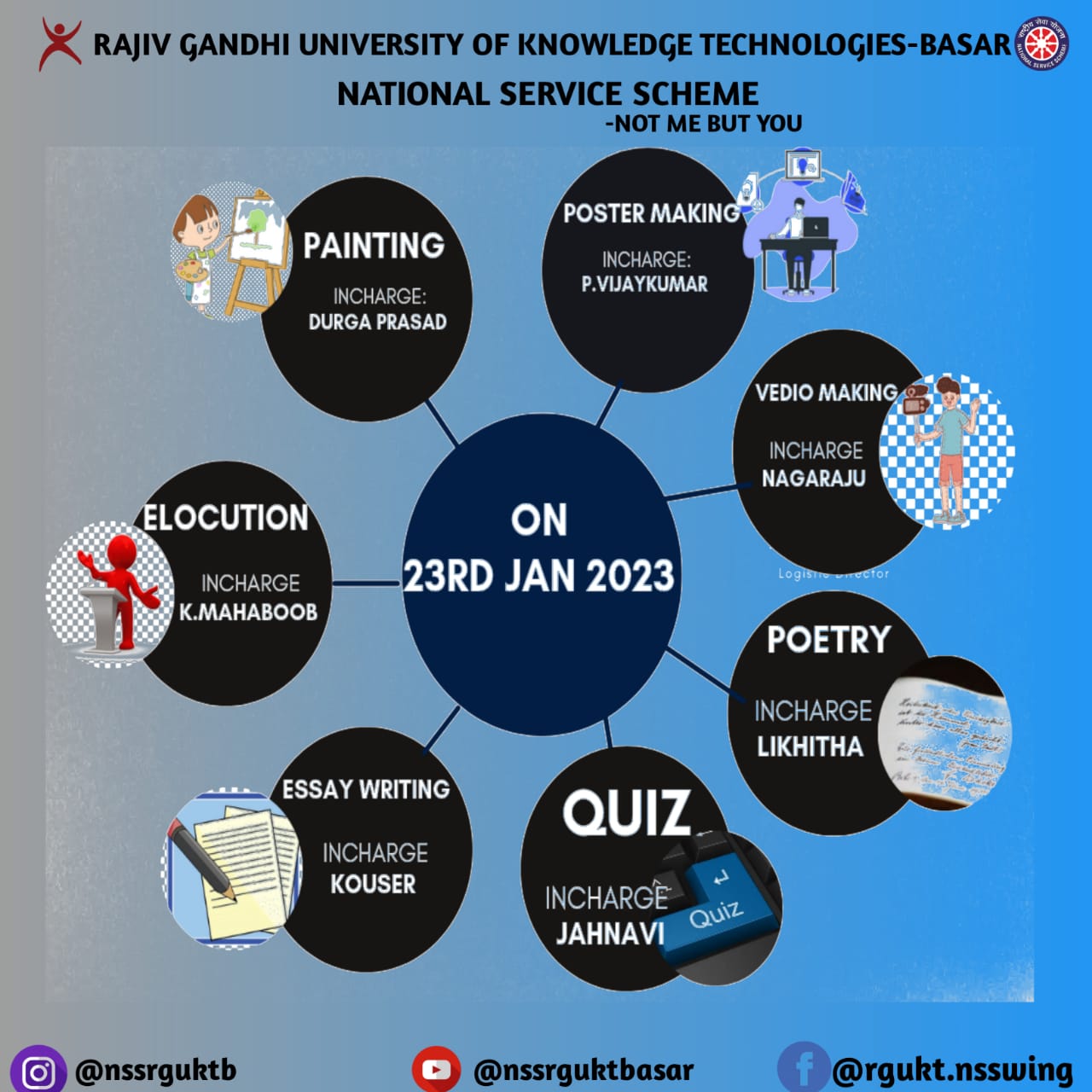
It is inform to all the NSS volunteers of the AY 2022-23 is, we the NSS Team conducting such a wonderful and enthusiastic competitions on the occasion of NSS orientation programme in offline mode from now..
Here is the list of competitions for you,
1. Elocution
Theme: Role of youth in National development
languages: Telugu/ Hindi/ English
Time limit: 3mins
Venue: AB-1
Incharge: K. Mahaboob 9642778125
2. Digital Poster making
Theme: National Voters Day
Note: Need to bring Mobiles with all the required things, like templates etc..
Venue: AB-1
Incharge: P. Vijay Kumar 9381290648
3. Essay writing
Theme: Redusing hazards of using kites
Language: Telugu/ Hindi/ English
Venue: AB-1
Incharge: SK. Kouser 6309801074
4. Video making
Theme: My Pongal Vacations
Note: Need to bring Mobiles with all the required things, like templates etc..
Venue: AB-1
Incharge: L. Nagaraju 9010805116
5. Poetry
Theme: Service
Language: Telugu/ Hindi/ English
Venue: AB-1
Incharge: P. Likhitha 9951683108
6. Quiz
Venue: Civil block seminar hall
Incharge: Jahnavi 8897813858
All the competitions will be held on 23rd January,2023 at 5PM in the above mentioned places.
So we are requesting you to do participate actively in the every competition.
Do register your favourite competition here,
https://forms.gle/jRh8AFnEBsng7tRz6
Regards,
NSS RGUKTB.Download: Notice Attachment
Dear Students,


The tentative timetable for the aforementioned examinations is attached. Any requests for modifications should be communicated through the respective Heads of Departments on or before 27-Oct-25, 5PM.


Sd/-
Controller of Examinations
Download: Notice Attachment
Dear Students,

All students who are experiencing ACER laptop hardware issues, whether the issue is call-logged or not call-logged, are requested to visit the ACER Hardware Engineer Room and report their issue immediately.

Students experiencing any hardware-related problems, such as keyboard, touchpad, battery, adapter, fan noise, camera, speaker, hinges, motherboard, power issues, or any other hardware problem, must bring their laptops to the service room for inspection and repair.

Students with pending repairs are especially requested to visit the ACER Hardware Engineer Room, as the required spare parts have arrived.

As the laptop warranty period is going to expire soon, please make use of this opportunity and get your laptop issue resolved at the earliest.

Service Details

Venue: ABI Building – Opposite Room No. 205
Service: ACER Hardware Engineer Room

Important Instructions
1 Bring your laptop to the service room.
2 Clearly explain the issue to the Hardware Engineer.
3 Complete the required service/repair procedure.
4 After completion of the repair, collect your laptop personally.
5 Visit the service room as early as possible to avoid delays.
6 Please utilize the service facility before the warranty period expires.
It is here by informed to all E2,E1 and PUC2 NSS Volunteers that the NSS wing of RGUKT BASAR is going to conduct Regular Activity programme on 07-01-2018 i.e,Sunday at SAC Building at 07:30am.All the NSS Volunteers should be present at SAC Building by time.

NOTE : Before coming Please complete your Breakfast.

Sd/-
D.Shyambabu
NSS Co-ordinator
RGUKT BASAR.Dear Students of PUC-I & II,
Please find the attached time table of iB Group English.Download: Notice Attachment