Academics Notices
Dear PUC-II Students,
Find the attachment for the subject cited above.

Sd/-
Academic Section
Download: Notice Attachment
Dear Students,

Please find the enclosed for complete details on the subject line.

Sd/-
T&P Office
Download: Notice Attachment
"I see technology as being an extension of the human body" said David Cronenberg,
With the technology becoming a part of our living, it is very important to learn and understand them in a better way.
With this in mind we invite you to join the "Workshop on Robotics and IOT" to understand and learn about these booming technologies.
Please refer the attachment for further details.
Download: Notice Attachment
Dear PUC-I students,

The feedback survey conducted today between 2.30 to 3.30 PM is a trial survey. The original survey will be conducted on Tuesday (15.11.2016). The timings of survey on 15th will be posted in the hub very soon. Trial survey is conducted for PUC-I students only to give awareness on the process of feedback.It is here by informed to all the PUC-I students that, those who are eligible for scholarship are required to apply for Scholarship for the Academic Year 2021-22 to get the fee reimbursement from the Govt. of Telangana State.
The following is the link for fresh registrations for scholarship: https://telanganaepass.cgg.gov.in/
The following are the steps to be followed:
• In e-pass page click on Post Matric Scholarship Services.
• Next click on Postmatric Scholarships For Fresh Registration(2021-22)
Note 1:
The following documents are to be scanned and uploaded (wherever required) for fresh registration process:
a. Latest passport size photograph.
b. Aadhaar card of the Student (Name of the student on Aadhar card should match with SSC memo)
c. Bank pass book first page (which showing student name, Bank Account Number and IFSC code of the bank branch). Any nationalized bank and branch with minimum balance (not Zero account), don’t use joint account (For EBC students Bank pass book is not mandatory).
d. STUDY/BONAFIDE CERTIFICATE from class 4th to 10th.
Note 2: Student has to keep the following information ready in hand to register for scholarship.
a. Application number of caste certificate obtained from Meeseva centre.
b. Application Number of Income Certificate obtained from Meeseva centre latest by 01-04-2021.
c. S.S.C Hall ticket number, Year of pass, SSC pass type (Regular/Supple./CBSE/ICSC/Other Board etc.) to access the application
d. Scholarship type: College Attached Hostel
e. Admission Number: Student ID Number
f. College Admission Date and Hostel Admission Date: Student Admission Date (which is mentioned on admission slip, provided at the time of admission)
Note 3:
a. Student has to carry his/her mobile while applying for scholarship to enter ONE TIME PASSWORD at the time of registration (Mobile number may belongs to the student’s or student’s family members).
b. Should have mail ID to save scanned documents for further use.
For detailed demo video, copy and paste the following links on browser:
https://drive.google.com/file/d/18Vkk8rUjaDciXvAr1zsPq0Z7NxvytkhN/view?usp=sharing
https://drive.google.com/file/d/1L0CkMEsy96ZkwgXX_0jYnsjbnsKuXf4d/view?usp=sharing
for further queries contact Section land Number : 9492303714
Sd/-
Scholarship SectionDownload: Notice Attachment
Dear Students

Please find the attachment of the subject cited.

Sd/-
Academic Section
Download: Notice Attachment
Job Announcement of Ideya Labs

The T&P Team wishes to inform about a career opportunity at Ideya Labs. Ideya Labs would like to hire CSE graduates of 2024 for Blockchain Engineers & Data Science/ AI&ML Engineers, with following eligibility criteria.

Eligibility:
•	Branch: CSE
•	CGPA: 8.5 and above

Job Profile:
•	Designation: 		Blockchain Engineers, Data Science / AI & ML Engineers
•	Place of Posting:
•	Job Description:

Salary Details:
•	CTC:			4 LPA


How to Apply: If meet the eligibility criteria and interested about this opportunity, please apply through the Training & Placement Portal (https://tpcrt.rf.gd) by January 8, 2024.


Sd/-
T & P Office
Download: Notice Attachment
                                           SCHEDULE OF EFFTRONICS DRIVE
It is hereby informed to aspirants of Efftronics that the drive has been scheduled on 13-10-2021 at 11:00 AM, to attend the drive need to register at given link by selecting the respective role groups by 12-10-2021.
Registration Link: Efftronics > Registration (speedexam.net)
Group Name:

(i) RGUKT BASAR @ FIRMWARE ENGINEER [EEE-ECE-EIE, IOT]-2021-22

(ii) RGUKT BASAR @ SOFTWARE ENGINEER [CSE-IT- MCA, IOT]-2021-22

(iii) RGUKT BASAR @ DATA SCIENTIST [All Circuit Branches/MSc]-2021-22

Note: Hence, it is an online test we request all the aspirants to register as per their branch for the smooth flow of the process.

Selection Process:
•	   Written Test
•	   Technical Interview
•	   Technical Final round
•	   HR Interview
•	   Fitness Test
TERMS & CONDITIONS:
1. There would be 2.5 years agreement with the company wherein the Candidate needs to submit all his/her original Certificates for the agreement period.
2. Training period would be for a total period of 6 months.


Sd/-
T&P Office
Download: Notice Attachment
17, Jun 2025:
Examinations:AY24-25_PUC-II_AE(R&GI)&P2S1_EST(Rem)_Jun-25_17-06-2025_Seating_Allotment
Dear Students,
                   It is to inform that all the students who have donated blood on blood donation camp are requested to collect your certificates and donation cards at AB-II 012 on 5:30 pm to 7:30 PM till tomorrow.

Note: Who are not collected your certificates of previous year are also requested to contact.

Contact:
Mr Rajkumar Bhukya
B121540
Cell: 9701652822
AB-II 012Dear students,
The PUC Physics Lab Exams (Remedial/GI) for the registered candidates would be held on 15th October 2020 ( 11:15 am - 2:15 pm), the venue being PUC Physics lab - Old block.
Please maintain Social distancing at all times for the safety of everyone.
Dear Students,

Please go through the attached notice

Sd/-
T&P OfficeDear all,
Please find the attached file.Download: Notice Attachment
Please find the attachment...Download: Notice Attachment
Dear Students,

SCHEDULE OF MEDHA SERVO RECRUITMENT DRIVE

It is hereby informed to all registered students of MEDHA SERVO that the recruitment drive is scheduled on 9th Sept 2019 at AB-I Auditorium at 10:00AM sharp followed by Written test (Test Room-1) at 1st floor Administrative Building(AB-3). The details (history of backlogs) are as submitted by the candidates concerned during T&P registration, any discrepancies in the same would be the sole responsibility of the candidate concerned.

Note: Go through the attached notice for eligible list
sd/-
Placement Office
Download: Notice Attachment
For details go to the attached file.Download: Notice Attachment
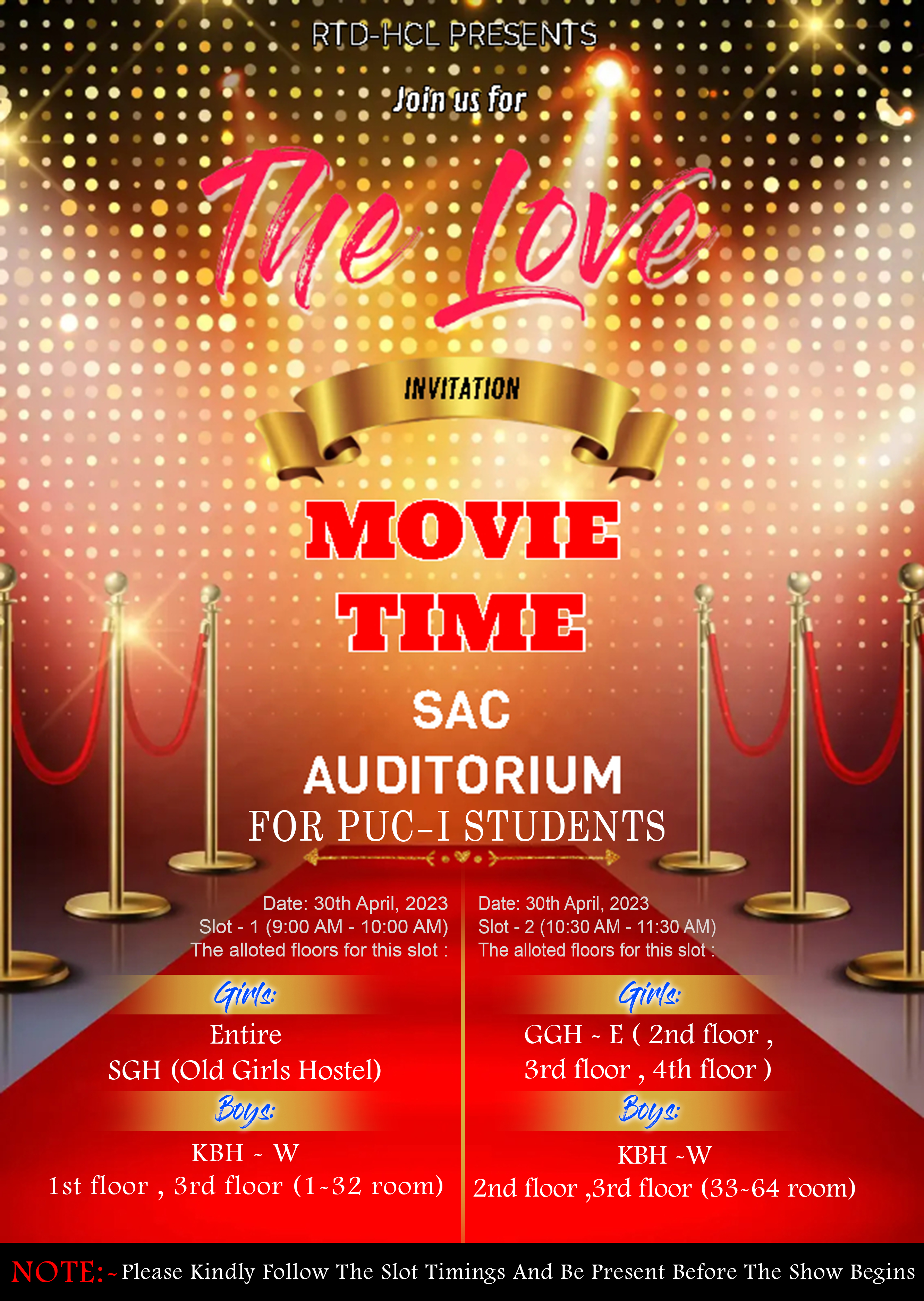
Date :30th April, 2023
Slot -1( 9:00 AM - 10:00 AM )
The alloted floors for this slot :
Girls :
ENTIRE SGH (Old girls hostel)
Boys :
KBH - W (1st floor , 3rd floor (1-32 room))

Slot-2 ( 10:30 AM - 11:30 AM)
The alloted floors for this slot :
Girls :
GGH - E ( 2nd floor , 3rd floor , 4th floor )
Boys :
KBH -W( 2nd floor , 3rd floor (33-64 room))
Download: Notice Attachment
Dear Student,
      It is hereby informed to the E4 CRT Registered students that the Pre Assessment test is Scheduled on today I.e. 03-July-2019, at AB II 3rd Floor (305,307,308.309.310).

Please find the slots and timings.

Slot:1
Today at 2:00 PM
(who attended the CRT training in below classes)
AB-I   012
ABI- I 003
AB-I 011

Slot:2
Today at 3:00 PM (who attended the CRT training in below classes)
AB I- 112
AB I – 103
AB II – 003 or 012 or 112

Sd/-
Placement Office.